Edit in place ⌘K
Select code, say what should change, review the diff right there. Keep it or undo it.
An open source AI code editor that works with whatever you already use. Plus 18 free models to start on.
Free and MIT licensed. Also for Windows and Linux.
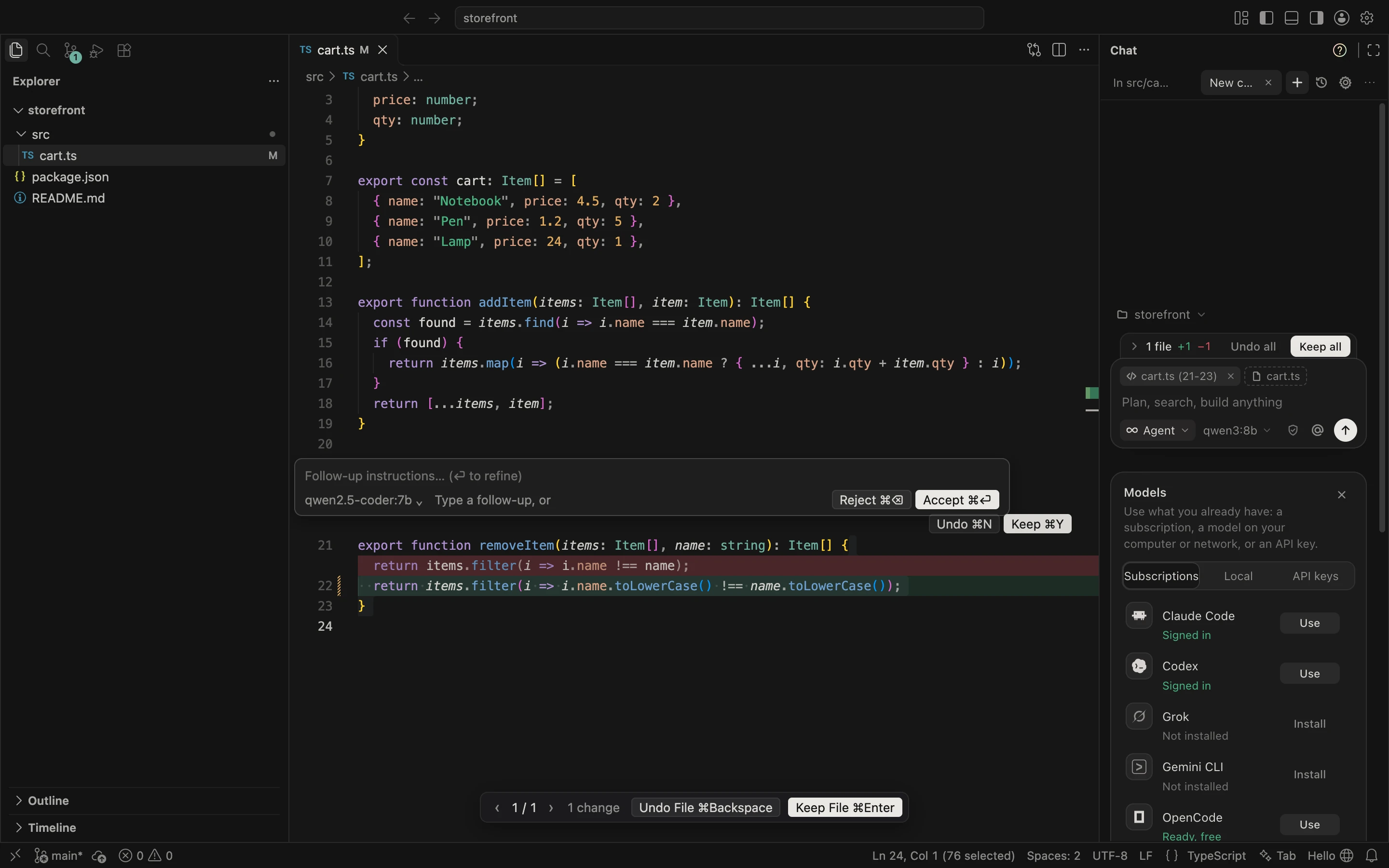
Use what you already pay for, run a model on your own computer, or start free. Switch from the model menu at any time, even halfway through a conversation.
Paste a key and pay the provider directly. Nothing goes through us.
Signed in to a coding tool already? OpenCursor drives it, so your plan just works.
Models on your own machine. Nothing leaves it, and it works offline.
On the providers' free tiers with a free key, which OpenCursor walks you through. OpenCode's free models need no account at all.
The parts of Cursor people use every day, open and in one place.
Describe the change. The agent reads your code, edits files and runs commands, and checks with you before anything risky. Pick how it works with ⌘ .
Select code, say what should change, review the diff right there. Keep it or undo it.
Suggestions as you type, from whichever model you pick for it.
Point the agent at files, folders, docs or your git changes.
Say what you want to run in plain words and get the command.
Every agent step can be rolled back, files and all.
Connect MCP servers to give the agent tools beyond the editor.
Download the app, or paste one line into a terminal. The line picks the right file for your system and skips the first launch warnings.
curl -fsSL opencursor.org/install.sh | shFirst launch. The app is not notarized by Apple yet. If macOS says it can't check it, open System Settings, Privacy & Security, and click Open Anyway.
irm opencursor.org/install.ps1 | iexFirst launch. If SmartScreen appears, click More info, then Run anyway. No administrator rights needed.
curl -fsSL opencursor.org/install.sh | shUpdates. The app checks for new releases on its own, on every system.
Every line is on GitHub under the MIT license. Read how it works, fork it, send a pull request, or open an issue when something breaks. The app can start one for you from Help.
The open source Cursor. An AI code editor that works with whatever model you already use.
Yes. OpenCursor is free and open source under the MIT license, with no account and no subscription. If you use a paid model, you pay that provider directly, at their price. With the free models or a local model, it costs nothing at all.
It is an independent, open source AI code editor with the workflow people use Cursor for every day: an agent chat with Agent, Plan, Debug and Ask modes, Cmd+K edits in place, Tab completion, @ context, project rules and MCP servers. The difference is that it runs on the model you choose instead of a subscription. It is not made by or affiliated with Anysphere, the company behind Cursor.
Yes. If you are signed in to Claude Code or the Codex CLI, OpenCursor drives it in the background, so the work counts against the Claude or ChatGPT plan you already pay for. Gemini CLI, Grok and OpenCode work the same way.
OpenCode's free models work with no account, installed in one click. On top of that, 18 models are free on the providers' own free tiers, from Groq, Google Gemini, Mistral, NVIDIA, OpenRouter, Z.ai and SambaNova; each needs a free key, and OpenCursor shows you how to get one. Free (auto) moves to the next free model when one reaches its limit.
Yes. Point it at Ollama, LM Studio or any OpenAI compatible server, on your computer or another one on your network. Nothing leaves your machine, and it keeps working without internet.
No. There is no OpenCursor server in between: requests go from your computer straight to the model provider you picked, and API keys stay in your system keychain. Once a day the app sends an anonymous install count (a random ID, the version and the OS), which you can turn off in Settings.
OpenCursor is built on Code-OSS, the open source core of VS Code, so themes, keybindings and most extensions work as before. Extensions install from Open VSX, and your settings and keybindings come over from VS Code or Cursor in one step.
macOS on Apple silicon and Intel, Windows on x64 and Arm, and Linux as .deb, .rpm or .tar.gz on x64 and arm64. The app updates itself when a new release is out.